Agenda
AGENDA
DAY 1 - Thursday, July 22, 2021
(All Times Italy - CEST)
Serverless on AWS
| Time | Module | Speaker | Notes |
|---|---|---|---|
| 1:00-1:45 PM | Overview of Serverless on AWS | Jason Hoog, AWS Solution Architect | Introduction to serverless and discuss how building modern applications with serverless technologies allow developers to focus on your core product. You will gain an understanding of how AWS Lambda, Amazon API Gateway, and other managed services can be used to build nearly any type of application or backend service. |
| 1:45-3:00 PM | LAB: Building a Serverless Web Application | Use Amazon S3, API Gateway and Lambda to build a serverless web application
INSTRUCTIONS:
| |
| Take a BREAK during the lab at your own convenience | |||
| 3:00-3:45 PM | Event Driven Architectures | Vamsi Vikash Ankam, AWS Specialist Technical Account Manager | Learn why companies are increasingly adopting event-driven architectures to build highly-scalable solutions. Learn how Amazon EventBridge, Amazon SNS, Amazon SQS, and AWS Step Functions can be used to power communication between decoupled services, increasing agility and resiliency of solutions. |
| 3:45-5:15 PM | LAB: Serverless Document Processing |
Use AWS Serverless services to build a document processing system with Amazon S3, Lambda, DynamoDB and Textract. INSTRUCTIONS:
| |
| Take a BREAK during the lab at your own convenience | |||
| 5:15-6:00 PM | Serverless Architecture and Patterns | Vamsi Vikash Ankam, AWS Specialist Technical Account Manager | Serverless architectures can be used to build a large number of systems. We explore common patterns across IT automation, microservices, and data processing. |
DAY 2 - Friday, July 23 2021
(All Times Italy - CEST)
Devops for Serverless and EKS
| Time | Module | Speaker | Notes |
|---|---|---|---|
| 1:00-1:45 PM | Overview of CI/CD for Serverless Applications | Sriram Dhandapani, AWS Technical Account Manager | Learn how infrastructure-as-code and tooling such as the Serverless Application Model and Serverless Application Repository help manage your serverless applications. We will discuss how to simplify building, testing, and deploying applications. |
| 1:45-3:00 PM | LAB: CI/CD with Serverless | In this workshop, you will learn how to start a new Serverless application from scratch using the AWS Serverless Application Model (AWS SAM) and how to fully automate builds and deployments by building a continous delivery pipeline using the AWS CDK. You will also learn how to run a Serverless application locally using the SAM CLI.
INSTRUCTIONS:
| |
| Take a BREAK during the lab at your convenience | |||
| 3:00-3:45 PM | Serverless Observability | Jason Hoog, AWS Solution Architect | Monitoring and observing distributed applications introduce challenges in understanding the state of your application. We will explore how to use AWS Services such as CloudWatch and X-Ray can be used to continuous monitor your application. |
| 3:45-4:30 PM | Overview of Containers on AWS | Overview of running containers on AWS using Amazon ECS and EKS. | |
| 4:30-6:00 PM | LAB: CICD with Blue/Green deployments to EKS using CDK |
In this workshop you'll learn how to build a CI/CD pipeline (using AWS CodePipeline) to develop a web-based application, containerize it, and deploy it on a Amazon EKS cluster. You'll use the blue/green method to deploy application and review the switchover using Application Load Balancer (ALB) Target-groups. You will spawn this infrastructure using AWS Cloud Development Kit (CDK), enabling you to reproduce the environment when needed, in relatively fewer lines of code.
INSTRUCTIONS:
|
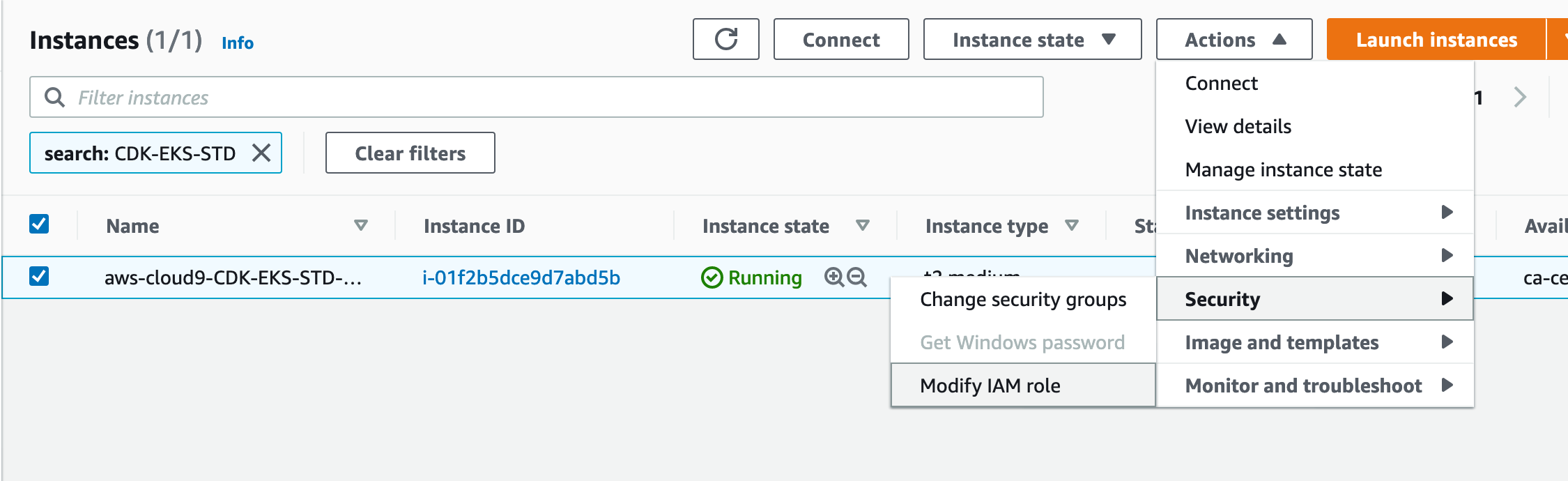
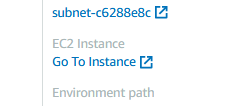 Once in the instance, choose Modify IAM role from the Actions -> Security dropdown:
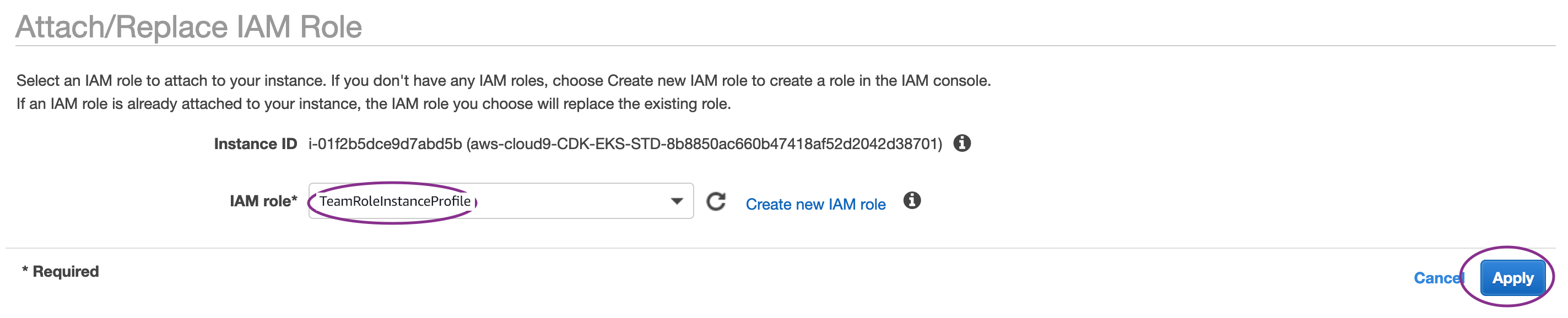
 Choose the TeamRole and click Apply
 Go to your Cloud9 environment and select the setting icon as shown below:
 Select AWS Settings as shown below:
 Disable the Temporary Credentials option as shown below:

If you receive an error indicating your Cloud9 Environment is out of disk space, you can run the below commands to increase it.
wget https://cicd.serverlessworkshops.io/assets/resize.sh
chmod +x resize.sh
./resize.sh 30